Analog Clock-7 Mobile7.21
Publisher Description
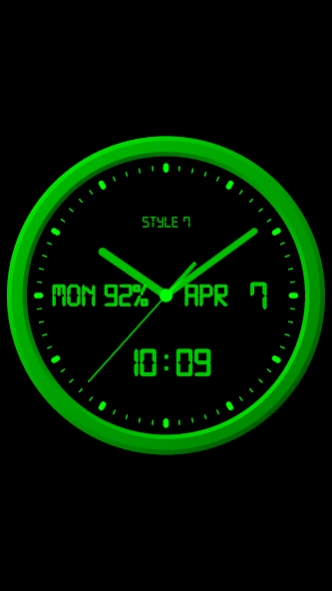


Classic monochrome analog and digital clock on black background
The analog clock also shows the current date, day of the week, month, battery charge. It also shows a digital clock. The clock uses a digital font (except for the widget), but you can also use a regular font.
The clock can tell you the current time by voice by double-tapping (except for the widget) or at a certain interval, for example, every hour.
Use the analog clock as a Live Wallpaper. Set the size and position of the clock on the Home screen.
Use the analog clock as an app widget. Set the size of the clock and its position on the Home screen in the standard way. Starting with Android 12, the second hand is shown. You can also open the Alarm app by tapping.
Use the analog clock on top of all windows on the Home screen. The clock will stay in place when you swipe. You can set the size of the clock and its position on the Home screen.
Use the analog clock in full-screen mode with the display always on.
Use the analog clock as screensaver while a device is charging.
🕒 Use analog clocks as “Night Clock” — a calm mode with economy style (black background and dark‑gray hands) that saves battery.
Random position change every minute protects the screen from burn‑in.
All options work in Fullscreen mode, Live Wallpaper, and Screensaver.
🌙 Use analog clocks as “Always on Screen” — the clock remains visible even when the screen is turned off. ⚠ Important: the function does not start automatically, you need to launch it manually in Fullscreen mode.
“Always on Display” emulation works through additional options: 🔆 brightness control and Auto‑lock on exit.
In the settings, you can choose any color for the clock and also hide any additional information on the dial.
About Analog Clock-7 Mobile
The company that develops Analog Clock-7 Mobile is Style-7. The latest version released by its developer is 7.21. This app was rated by 10 users of our site and has an average rating of 2.2.
To install Analog Clock-7 Mobile on your Android device, just click the green Continue To App button above to start the installation process. The app is listed on our website since 2026-05-16 and was downloaded 248 times. We have already checked if the download link is safe, however for your own protection we recommend that you scan the downloaded app with your antivirus. Your antivirus may detect the Analog Clock-7 Mobile as malware as malware if the download link to com.style_7.analogclock_7mobile is broken.
How to install Analog Clock-7 Mobile on your Android device:
- Click on the Continue To App button on our website. This will redirect you to Google Play.
- Once the Analog Clock-7 Mobile is shown in the Google Play listing of your Android device, you can start its download and installation. Tap on the Install button located below the search bar and to the right of the app icon.
- A pop-up window with the permissions required by Analog Clock-7 Mobile will be shown. Click on Accept to continue the process.
- Analog Clock-7 Mobile will be downloaded onto your device, displaying a progress. Once the download completes, the installation will start and you'll get a notification after the installation is finished.
Program Details
System requirements
Download information
Pricing
Version History
version 7.21
posted on 2026-05-16
Minor changes.
version 7.2
posted on 2026-03-19
* Added "Mini Clock" mode for Android 8+. When enabled, the clock collapses into a standard floating window that can be moved around the screen and snapped to the edge. You can return to the normal mode at any time. Enable it from the main menu.
* Other improvements and fixes.
version 7.11
posted on 2026-03-09
* Added support for the system language switch on Android 13+. The app language can now be changed directly in your device settings.
Quick path: App Menu → Help → Menu → Information.
* Small updates and improvements.
version 7.0
posted on 2025-11-23
⚙️ Settings → Night Mode
🕒 Economy style (black background and dark‑gray hands) helps save battery
🔄 Random position change every minute protects the screen from burn‑in
📱 All options work in Fullscreen mode, Live Wallpaper, and Screensaver
🌙 In Fullscreen mode you can enable Always on Display emulation through options: brightness control and Auto‑lock on exit. ⚠ Important: the function does not start automatically, you need to launch it manually
version 6.7
posted on 2025-09-25
Live Wallpaper:
* Minor improvements;
* Fixed bug while change a screen orientation.
Minor changes, including to support Android 16.
version 6.61
posted on 2025-04-28
* Menu - Help;
* Minor changes.
version 6.6
posted on 2025-04-03
Screen saver for charging device.
For set: Menu-Set clock as-Screen saver.
For help (reccomended for read): Menu-Help.
For tune: Settings-Screen saver.
version 6.4
posted on 2025-02-17
* Fixed important bug for Live Wallpaper for some devices;
* Minor changes.
version 6.3
posted on 2024-12-05
* App shortcuts: Fullscreen, Settings (Android 8+). Use long touch on the app icon for show menu with app shortcuts. Hint: you can put an app shortcut on the Home screen by 'drag and drop'.
* Minor changes.
version 6.2
posted on 2024-10-19
* High sound volume mode for time to speech. For change sound volume set it off.
* Open inbuilt alarm app by tap for app widget (use settings of aт app widget).
Update for support Android 15
* Changes for Android 15.
New minor features for Android 15:
1. App widget preview with current settings.
2. You can select full screen analog clock to the small cover screens of supported flippable devices.
